It's the last week of the quarter. Your sales team just got off calls with three major accounts. GlobalTech is accelerating their order. Acme is pushing out. Midwest Manufacturing wants to add a new product line.
Now you need to update the forecasts in Manufacturing Cloud.
Manufacturing Cloud · Forecast Update
20min
Per account
3
Completed
47
Remaining
01Open account — GlobalTech
02Click into the forecast record
03Find the right product family
04Find the right period
05Update the number. Save.~2 min
06Back to account list. Open Acme. Repeat.× 50
This exact sequence runs across 50 accounts, 12 product families, and 4 periods — turning simple updates into repetitive admin work.
↻ Repeats × 50
47 more to go.
The cost is not the edit itself. It is the repetition required to keep forecasts current.
Progress: 3 / 50 accounts
Valorx Wave
There’s a faster way.
Update forecasts across accounts, product families, and periods in a single grid. No constant navigation. No repetitive record edits. Just faster planning.
Salesforce Manufacturing Cloud is powerful. It gives you account-based forecasting, sales agreements, rebate management, and demand visibility that most CRMs can't touch.
But the native interface was designed for viewing data, not editing it at scale.
Every forecast update requires the same ritual: navigate to the account, open the forecast record, find the field, make the change, save, navigate back. One record at a time. One click at a time.
For a demand planner managing 50 accounts across 12 product families and 4 quarterly periods, that's potentially 2,400 individual forecast records.
Even if you only touch 10% of them each week, you're clicking through 240 records.
That's not planning. That's data entry.
When the click-by-click approach breaks down
Rolling forecast updates
Every month, you need to roll your forecast forward. Last month's actuals replace the forecast. Next quarter's projections shift into the current view. New periods get added to the horizon.
In the native UI, this means touching every account's forecast records to shift values across time periods. A task that should take minutes takes hours.
That's not forecasting. That's time travel by hand.
You're in the weekly S&OP call. Operations asks: "What if we shift 20% of Q3 demand into Q4 for the industrial pump line?" You say, "I'll update that after the meeting" and scribble a note. The scenario analysis that should happen in real-time gets pushed to tomorrow.
That's not planning. That's homework.
Here's exactly what that looks like in a live S&OP meeting.
Weekly S&OP Call · Live Scenario
Operations asks a simple what-if. The answer depends on your tool.
What if we shift 20% of Q3 demand into Q4 for the industrial pump line?
Operations, mid-call
Spreadsheet⚡ Seconds
Excel / Google Sheets
1Select the Q3 forecast cells for the pump line
2Apply ×0.8 formula — Q3 drops 20%
3Paste +20% offset into Q4 cells
✓ Done. Show the room.
Everyone sees the updated numbers instantly. The conversation continues.
Native UI⏳ Everyone waits
Manufacturing Cloud
1Open account #1
2Find the Q3 forecast for industrial pumps
3Reduce by 20%. Save.
4Find the Q4 forecast for industrial pumps
5Increase by 20%. Save.
6Go back. Open account #2. Repeat steps 2–5.
✗ The call is on hold.
Everyone on the call waits while you navigate account by account.
💡
Wait — are those Excel changes syncing back to Salesforce in real time? They're not. That's the real problem. You get spreadsheet speed, but your Salesforce data stays stale. Someone has to manually re-enter everything — or the two systems just drift apart.
Valorx Wave
Spreadsheet speed. Salesforce stays in sync.
Valorx Wave gives you a live grid inside Salesforce — edit forecasts like a spreadsheet, and every change writes back instantly. No re-entry. No drift. No waiting.
Leadership wants all "Upside" forecasts moved to "Commit" for accounts that hit 90% of last quarter's projection. That's a conditional update across your entire forecast base.
The native approach: run a report to identify qualifying accounts, then manually update each forecast record's category field. One by one.
That's not a process. That's a bottleneck wearing a process costume.
New product line rollouts
You're adding a new product family to 30 accounts. Each account needs forecast records created for the next four quarters, with initial projections based on their existing product mix.
In the native UI, that's 120 new records to create manually. With the same click-through process for each one.
That's not a rollout. That's a punishment.
What slow forecasting actually costs you
The obvious cost is time. But the real damage is subtler. Slow updates force a three-way trade-off: coverage drops, freshness drops, and accuracy drops.
The cost of slow forecasting
What painful forecast updates really cost your business
Slow forecast updates do more than waste time. They reduce freshness, coverage, and accuracy across your planning process.
20 min
Per account
When one update takes this long, forecasts age faster than your team can refresh them.
30%
Revenue at risk
Smaller accounts get skipped first when teams fall behind, even though they still matter.
20%
Scenario shift
A basic Q3-to-Q4 demand change becomes too slow to test live, so planning turns static.
200
Records rushed
Click-by-click updates create click-by-click errors when teams are moving too fast.
2,400
Total forecast records
Managing forecasts across 50 accounts, 12 product families, and 4 quarters isn't planning — that's admin work.
32 hrs/month
Lost to updates
Time that should go into decisions, scenarios, and exceptions gets spent just keeping forecasts current.
That's not demand planning. That's damage control.
What fast forecasting looks like
Imagine updating forecasts the way you work in Excel.
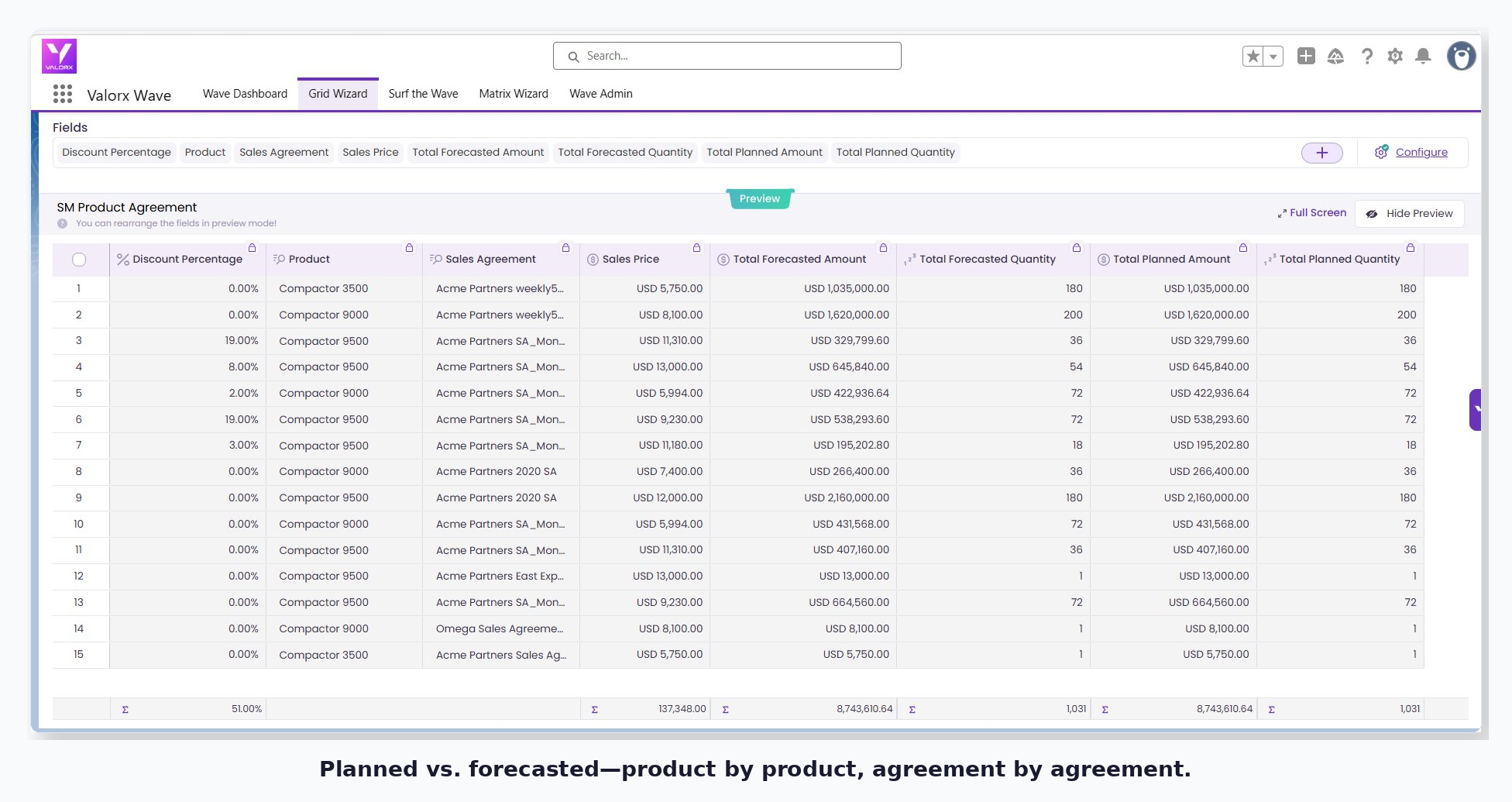
All your accounts in one grid. Every value editable inline. No navigating away.
Select 50 cells. Apply a 10% increase. Done.
Across every account, every product family — in a single action.
Filter to Midwest region accounts only.
Inline filters — no new tab, no report, no export.
Sort by forecast variance. Update the outliers.
See the problems immediately. Fix them without leaving the grid.
Save everything at once.
All changes write back to Salesforce instantly. No re-entry. No drift.
That's the difference.
Not a faster version of the same process — a fundamentally different one.
Before: data entry disguised as planning
After: actual demand planning
Spreadsheet speed, Salesforce security
Wave brings spreadsheet-style editing directly into Salesforce. No exports. No external tools. No sync issues.
Your Manufacturing Cloud forecast data appears in an editable grid inside Salesforce Lightning. Same data, same security, same audit trail—but with the bulk editing capabilities your planning process actually needs.
For demand planners, this means:
Update 50 accounts in the time it used to take to update one.
Bulk forecast updates let you select multiple accounts, products, or periods and change them in a single action—no more clicking through records one by one.
Stop switching between multiple tabs.
Multi-object views display forecast records alongside sales agreements, opportunities, and account details in one grid.
Spot problems before they become surprises.
Conditional formatting automatically highlights forecasts that exceed variance thresholds or miss targets—so outliers don't hide in rows of data.
Keep workflows moving without leaving the grid.
Grid Actions trigger Salesforce flows for approvals or notifications directly from your forecast view—no context-switching required.
The update that took 20 minutes per account now takes 20 minutes for all accounts.
Wave in action: In the S&OP meeting
With Valorx Wave, what used to take more than 20 minutes is now a job of under 30 seconds. Back to that S&OP call — here's how it actually ends.
Wave in Action · Live S&OP Meeting
⚡ 30 seconds
Operations asks, mid-call
"What if we shift 20% of Q3 demand into Q4?"
1
Filter the grid to Q3 industrial pump forecasts
2
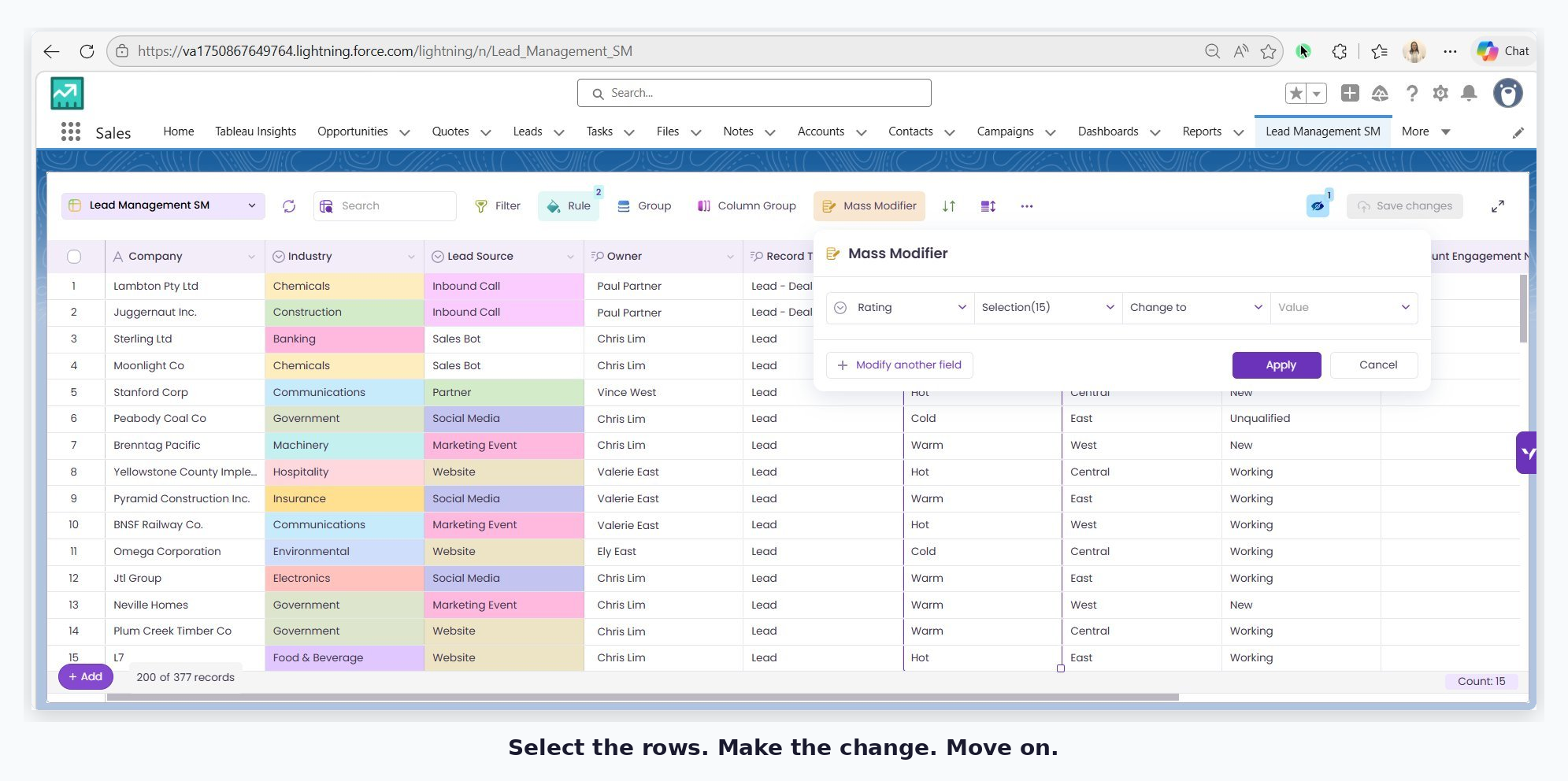
Select all rows. Apply 20% reduction with Mass Modifier
Mass Modifier
3
Switch filter to Q4. Add the shifted volume
30s
Total time
The scenario is visible. The conversation continues with real numbers.
No follow-up email. No "I'll update that after the meeting."
✅
Leadership approves
Save. Salesforce is updated instantly. Done.
↩️
Direction changes
Discard. No damage. Try a different scenario.
That's not a demo trick. That's Tuesday.
Either way, the decision happened in the meeting.
ROI: How much could you save by automating Salesforce Forecast updates?
Let's see it in numbers!
Your Forecasting Savings with Valorx Wave
Drag the sliders — your savings update instantly
Your Setup
Accounts you manage50
Product families per account12
Forecast periods (quarters)4
Records updated weekly (%)10%
Your hourly rate ($)$75
Your Savings with Wave
2,400
Total forecast records
240
Records updated weekly
32h
Hours/month on updates
$28,800
Annual cost without Valorx Wave
Estimated Annual Savings
$25,920/yr
346 hours back for actual planning
Valorx Wave cuts forecast update time by 90%. Try Wave for FREE.
You don't need to overhaul your entire planning process.
Start with one forecast view—your top 20 accounts, a single product family, or next quarter's projections. See what happens when forecast updates take seconds instead of hours.
The bottleneck in your demand planning might not be your process. It might just be your interface.
Valorx Wave
See how Wave transforms Manufacturing Cloud forecasting
Everything you need to know about forecasting in Salesforce Manufacturing Cloud — and how Valorx Wave fixes it.
All
The Problem
About Wave
Getting Started
Why is updating forecasts in Manufacturing Cloud so slow?
The native Salesforce interface is built for viewing data, not bulk editing it. Every update requires navigating to the account, opening the forecast record, finding the right field, editing, saving, and repeating — one record at a time. For teams managing 50+ accounts across multiple product families and periods, that's hundreds of individual clicks per update cycle.
How much time does manual forecast updating actually take?
For a demand planner managing 50 accounts, 12 product families, and 4 quarterly periods, there are potentially 2,400 forecast records. Touching just 10% of them weekly — 240 records — at roughly 2 minutes per record adds up to 32 hours a month on data entry alone. That's not planning. That's data entry.
Can't we just use Excel or Google Sheets instead?
You get spreadsheet speed, but your Salesforce data stays stale. Every change made outside Salesforce has to be manually re-entered — or the two systems drift apart. That's the core problem: speed without sync isn't a solution. Wave gives you both.
What is Valorx Wave?
Wave brings spreadsheet-style bulk editing directly inside Salesforce Lightning. Your Manufacturing Cloud forecast data appears in an editable grid — same data, same security, same audit trail — but with the ability to select, filter, and edit hundreds of records in a single action. No exports. No external tools.
How much faster is Wave compared to the native UI?
Wave reduces forecast update time by up to 90%. An update cycle that took 20 minutes per account now takes 20 minutes for all accounts. For most teams, that's the difference between a half-day task and a before-lunch task.
Can Wave handle scenario planning during live S&OP meetings?
Yes — that's one of its strongest use cases. You can filter the grid, apply a Mass Modifier (e.g. shift 20% of Q3 demand into Q4), see the result instantly, and save or discard in seconds. The decision happens in the meeting, not in a follow-up email three days later.
What is Mass Modifier?
Mass Modifier lets you apply a single change — a percentage adjustment, a value override, a category update — across hundreds of selected records simultaneously. That 10% adjustment leadership requested? Done in seconds. No macros, no formulas, no click-through.
Does Wave work with Sales Agreements and Opportunities too?
Yes. Wave's multi-object views let you display forecast records alongside sales agreements, opportunities, and account details in a single grid — so you're not toggling between tabs to piece together the full picture.
Do we need to overhaul our entire planning process to use Wave?
No. Start small — your top 20 accounts, a single product family, or next quarter's projections. Once you see how fast updates can be, you expand from there. The bottleneck in your demand planning might not be your process. It might just be your interface.
Is Wave free to try?
Wave Embedded (inside Salesforce) is free to try via the AppExchange. Wave for the browser is free to use — no credit card required. Both work directly with your existing Manufacturing Cloud data.
Does Wave require Salesforce admin setup?
Wave is installed via the AppExchange and works within your existing Salesforce Lightning environment. Your data model, security model, and audit trail stay intact — no custom development or major admin work required.